
Filters and breakdowns
Filters and breakdowns are used to refine your report data to meet your specific needs.
-
Filters are used to remove (or explicitly include) cases that don't match your criteria. For example, you might use a filter to remove cases in a certain status or filter to only show cases assigned to you
-
Breakdowns are used to group your data into meaningful segments. For example, you might use a breakdown to show the number of cases opened by case type, or to show how many actions are assigned to each user
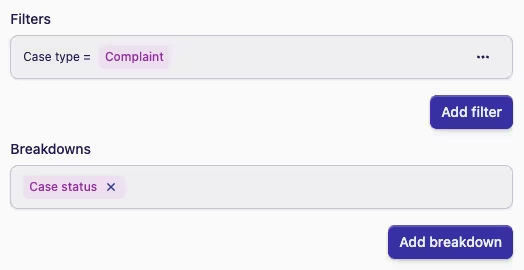
Example: below we show a report that is filtered to only include cases from the "Complaint" case type, and uses a breakdown
of "case status" to group the cases by their status.
Using multiple filters and breakdowns
You can add as many filters and breakdowns to a report definition as you like, which gives you a powerful toolkit to refine your reports to meet very specific requirements.