
Workflows
In Complyr, there are two types of workflows:
-
Action workflow: which guides your users through a case from start to finish
-
Status workflow: which controls how a case moves between statuses as you manage it
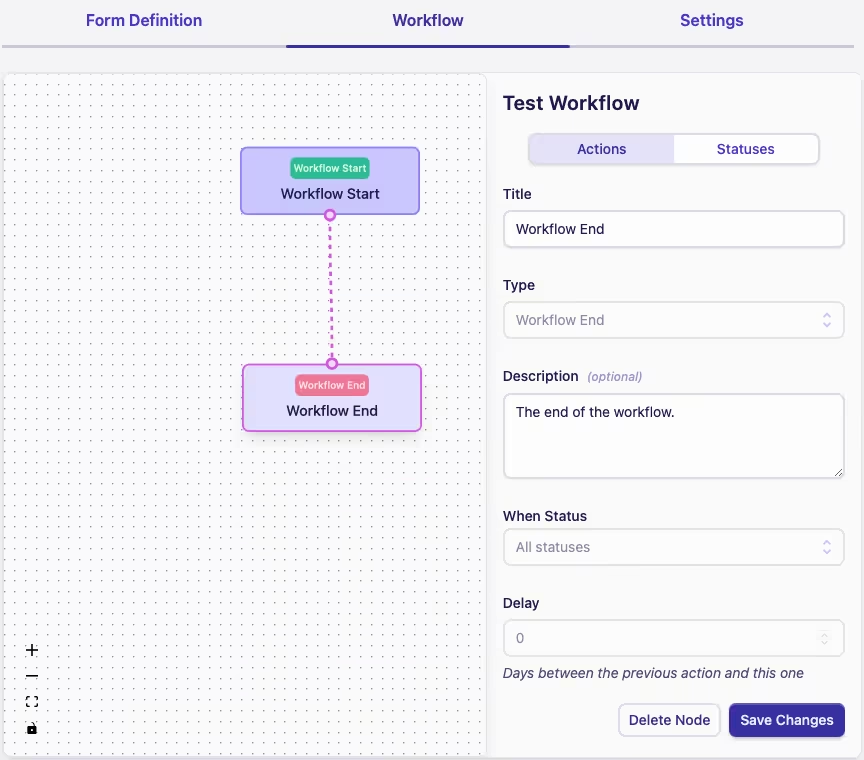
As you build the workflows you'll be working with node diagrams to create a visual representation of your business processes. Nodes and edges are the fundamental building blocks.
-
A node is the visual box on your workflow diagram and represents a step or status in your process
-
Ports are the small circles on a node to which the edges connect
-
An edge is the line connecting the nodes in an ordered way
Deleting nodes and edges
If you need to delete a node or edge from the workflow diagram, click on the node/edge to highlight it (a selected edge will be blue, a selected node will be pink), and the appropriate Delete Node / Delete Edge button will display beside the Save Changes button.